SharePoint is often the first intranet you consider when your company already works in Microsoft 365. It comes with the subscription and already holds your files, so it tends to become the intranet by default rather than by choice.
If you’re deciding whether SharePoint should be your intranet, or comparing it with platforms built for internal communication outside the Microsoft suite, how well it works depends on what you need your intranet to do.
In this piece, we’ll cover SharePoint’s strength in storing and sharing documents, what it takes to make it work for company communication, and an alternative that handles documents and communication together, so you don’t have to decide between functionalities.
SharePoint’s strengths as an intranet all come from what it already is: a document platform built into Microsoft's suite. The four points below are where that pays off, and where SharePoint wins against an intranet you'd buy separately
Document handling is where SharePoint is the strongest. You get version history, major and minor versions, co-authoring in Word and Excel, check-in and check-out controls, and document libraries that can hold a large volume of files with metadata and retention rules attached.
For teams whose main need is a structured, governed place to store and collaborate on files, SharePoint’s document management capabilities offer ample value.
The strength here is storage and control. Finding the right file again once volume grows is a separate matter.
If you pay for Microsoft 365, SharePoint comes with it. Microsoft's Business Basic plan page lists SharePoint alongside OneDrive, and the Frontline F1 and F3 plans carry it too. There's no separate product to buy or new vendor to onboard, which lowers the barrier to getting started and makes it an easy internal sell. For budget-conscious teams, starting with something already on the invoice is an understandable first move.
SharePoint integrates seamlessly with the rest of Microsoft 365. Files flow between SharePoint, OneDrive, and Teams, documents open in the desktop or web versions of Office, and access is governed through the same Entra ID identities you already manage. If your day already runs on Microsoft 365 platforms, SharePoint content sits close to where people work.
SharePoint inherits Microsoft 365's security and compliance stack, including granular permissions, data loss prevention, retention and eDiscovery, and audit logging. For organizations in regulated industries, that inherited governance is often the deciding factor. Meeting compliance requirements without adding a separate system is especially convincing for legal and IT teams.
|
Pros |
Cons |
|
Document management and storage: Version history, co-authoring, check-in and check-out, and libraries with metadata and retention rules. |
Low adoption: The learning curve sends employees back to email and chat, and views are tracked one page at a time. |
|
Included in Microsoft 365: Comes with plans like Business Basic and Frontline F1 and F3, with no separate vendor to onboard. |
Costs beyond the license: Design, custom pages, extra storage, and ongoing administration add to the total. |
|
Microsoft 365 integration: Files move between SharePoint, OneDrive, and Teams, with access managed through Entra ID. |
Limited communication tools: No targeting by location or role, no recognition, and no polls or surveys out of the box. |
|
Enterprise security and compliance: Inherits Microsoft 365 permissions, data loss prevention, retention, eDiscovery, and audit logging. |
Ongoing governance: Someone has to own permissions and site structure, or files get shared more widely than intended and duplicate sites appear. |
|
Harder to find content over time: Search returns old drafts alongside current policies as sites multiply. |
|
|
Frontline access: Mobile works for opening files and is awkward for checking a quick update between tasks. |
The same qualities that make SharePoint powerful for documents tend to work against it as an intranet. Here are a few problems that may come up for companies using SharePoint as an intranet:
A SharePoint intranet tends to be a place employees visit only when they have to.
Site collections, pages, web parts, and nested permissions make sense to an administrator, and they read as overhead to a store manager or a field technician who just wants this week's schedule. That learning curve sends people back to email and chat for anything they want seen, and the intranet ends up as a file store.
While SharePoint tracks unique viewers and views, it does so page by page, in each page's own analytics panel. Someone at the company has to go and review those numbers regularly. Without that, low adoption goes unnoticed until people have already stopped coming back.
SharePoint is often described as free because it comes with Microsoft 365 plans such as Business Basic. But the subscription only provides access to the platform, not a finished intranet. Design and information architecture, custom pages and web parts that usually need a developer or an outside consultant, storage beyond the included allowance, and ongoing administration all add to the total cost of using SharePoint as an intranet.
SharePoint is designed mainly for documents and sites, not internal communication. Out of the box, there's no way to send a company update targeted to a specific location or role, no employee recognition for milestones, and no polls or surveys to gather feedback. Teams often try to fill these gaps by combining SharePoint news pages, Teams channels, and email. That spreads the employee experience across several tools and leaves no single place where people go to find reliable, trustworthy information.
SharePoint's permission model is flexible, and that flexibility becomes a maintenance job. Without a dedicated owner, the system can become messy, and sensitive information may fall into the wrong hands. That ownership is recurring, hands-on work, and it usually falls on an IT or governance lead who already has a full plate.
SharePoint stores documents well, but finding the right one later can be difficult. As sites multiply and pages pile up, search returns stale drafts alongside current policies, and employees can't always tell which version is the one they're supposed to follow. Some organizations end up with tens of thousands of pages, and the more content accumulates without pruning, the less anyone trusts what they find.
SharePoint works for employees who have a desk, a company laptop, and a comfortable relationship with Microsoft 365. That leaves out the retail associates, nurses, drivers, and plant-floor staff who make up much of many organizations and rarely sit at a computer. The mobile experience is functional for file access but awkward for someone who needs a quick, one-tap way to see a schedule change or an important notice between tasks.
Given its pros and cons, should you still use SharePoint as an intranet? To decide, answer these questions:
Start with the main thing you need it to do. If the job is storing and governing documents for desk-based teams, SharePoint is squarely in its element. If the job is reaching people with timely, relevant communication and building a sense of connection, you're asking SharePoint to do work it wasn't designed for.
A good SharePoint intranet requires a ton of effort to build and maintain. Look at whether you have the IT capacity, a developer or consultant budget, and a named owner who can maintain sites, permissions, and content over time. If those are thin, that same flexibility becomes ongoing maintenance instead of something that helps you.
Count how many of your people work away from a desk. A mostly office-based, laptop-equipped workforce will navigate SharePoint reasonably well. A workforce with a large frontline or deskless population needs a mobile-first experience that SharePoint doesn't naturally provide.
The deeper your reliance on Microsoft tools, the more SharePoint's integrations pay off. Organizations that live in Teams, Outlook, and Office all day gain the most from keeping content in the same ecosystem. If your company relies on Google Workspace or several different platforms, SharePoint may create more friction than convenience. 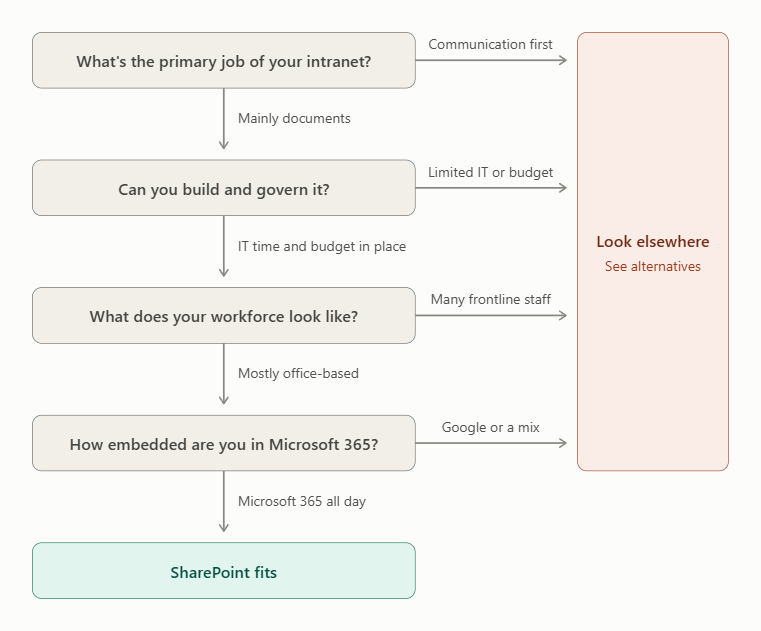
These two quick lists will help you see which side of the line your organization falls on:
The opposite profile points just as clearly in the other direction.
If you found yourself nodding along to the second list, it's worth looking at platforms built for the communication side of the problem rather than adapting a document tool to fit.
We put together a rundown of the top SharePoint intranet alternatives if you want to compare options side by side.
While SharePoint is a capable document platform, what matters most is choosing an intranet that fits how your organization works. As an employee success platform, Jostle might be the right call if you need to get updates to the right people and know they've read them. It also lets employees recognize each other's work, keeps one official copy of every policy, and reaches staff who never sit at a desk.
If you want to compare SharePoint and Jostle side by side, read our Jostle vs. SharePoint comparison.
The work SharePoint hands off to other Microsoft apps happens inside Jostle. Communication runs through targeted News, where leaders send updates by team, location, or role and add Notify push notifications for the ones that can't be missed. Employees then Sign-off to confirm they've read them. The Activity feed keeps recognition and everyday conversation in one place, with Shout-Outs tied to company values and automatic celebrations for birthdays and work anniversaries.
Jostle also ships with native iOS and Android apps and an optional JostleTV add-on for screens in shared spaces, so a delivery driver or a nurse between shifts gets the same experience as someone at a desk.
The governance side stays light on purpose. The Library gives policies and key files a curated home and syncs with Google Drive or OneDrive, with access controls managed in Jostle so permissions don't sprawl as people change teams. People directories and Teams org charts help employees find the right person quickly, and usage analytics show what's being read so you can retire stale content before it piles up.
If you'd like to see the alternative in practice, you can get a demo or start a free trial and see how Jostle compares for your own team.




Read more by
Gabe Scorgie

Jostle’s employee success platform is where everyone connects, communicates, and celebrates at work. Find out more at jostle.me. © 2009–2026 Jostle Corporation. All rights reserved.