Most intranets start strong at launch. Employees enthusiastically click around to explore, and leaders post warm welcome messages. But a few days later, there’s silence.
The repeated questions that prompted the idea of an intranet system in the first place reappear in Slack and email threads because it’s faster. The policies you spent months on go stale. And logins start to drop dramatically. Eventually, the platform becomes just another system in your stack.
The most common reason teams abandon intranet systems is that nobody plans for what happens after launch. Employees need a reason to keep using the platform. And the only way to ensure they do so is to make it an actually valuable resource. That means it needs to be both easy to use and well-maintained, so it serves as a daily go-to resource for answers and staying connected.
This guide will help you diagnose what’s going wrong with your current intranet and give you steps for choosing, launching, measuring, and sustaining an intranet that employees actually use.
The reasons employees drop off look different for every organization, but five patterns repeat across nearly every intranet that ends up underused. None of them is about the software's feature list. They're about the work that wasn't done before or after launch.
Stale content is the most common reason employees stop trusting an intranet. A benefits PDF that hasn't been updated in 18 months sits next to a current policy, and there's no easy way to tell which is which. The first time an employee follows outdated guidance and gets corrected by their manager, they stop relying on the intranet for anything that matters.
Most traditional intranets make this worse by spreading content across pages with no clear owner. HR may publish under one site, comms under another, and individual departments under their own pages. Without explicit ownership and a review schedule, content quietly drifts into "probably out of date" territory.
Jostle helps on both fronts. Library in Jostle organizes content into Categories and Volumes, with named Category Librarians and Volume Librarians who are accountable for keeping items accurate. And Scheduled Reviews let those owners set per-item review dates, so expiring policies appear in the owner's queue before they go stale.
If an employee searches for the expense reimbursement policy and the top result is a version from three reorgs ago, they'll do what's faster the next time and ask a colleague. Search trust collapses quickly, and once it's gone, the intranet stops being a reliable source of information, even if everything else works just fine.
To improve search results, Jostle pairs the standard search with Ask a Question, an AI-powered search tool that retrieves answers from your Library and the Jostle Support Center, citing the source items it pulled from. It's also permission-aware, so employees only see results from items they can already access.
But AI search is only useful if the underlying Library is accurate and current. That means you have to clean up your Library first, which is made much easier by Librarians and Scheduled Reviews.
Plenty of organizations launch an intranet that requires a corporate email login, then wonder why frontline employees don't show up. Field crews, retail floor staff, and shift workers don't always have a corporate email account. They check their phone on a break, not a laptop in an office. If the rollout assumed everyone had the same setup as HQ, half the workforce was excluded before day one.
Jostle addresses this directly. Employees can register with a personal email address or phone number, so access doesn't depend on having a corporate account. That’s one less step in onboarding new clients, and one less email for IT to configure to use the platform.
The Jostle mobile app on iOS and Android gives those employees the full platform experience on the device they already have in their pocket. And for shared spaces like break rooms, warehouses, or distribution floors, JostleTV streams relevant News, Shout-Outs, Activity, and Events to a connected display, so teams can stay informed no matter where they are.
Adoption is contagious from the top. If the CEO never posts or comments, that tells employees that the platform is optional. They’ll often go back to email or chat for anything that actually matters.
"Get exec buy-in" gets repeated in every adoption guide and skipped in most rollouts because it's too vague to act on. What you actually need is consistent, visible participation from leaders. That starts with a plan they can follow rather than relying on them to fit posting into their busy schedule.
Agree with one or two leaders before launch on a content cadence they'll personally own, like a weekly News post from the CEO with a 60-second video or a monthly comment thread on a strategic update where employees across the org can ask questions.
Between significant leadership posts, internal comms can fill the gap without breaking the attribution. News Editors in Jostle can draft, edit, and publish News items on behalf of a leader while keeping the original authorship intact. That way, a ghostwritten CEO blog still shows up as from the CEO’s account.
Recognition works on the same principle of consistency. When a leader shouts out an exceptional performer or acknowledges a senior team member’s retirement, the intranet starts feeling more like a key part of the company's day-to-day culture.
A platform without a content schedule runs on whoever has time. That usually means bursts of activity around launches or announcements, followed by stretches where nothing happens, which is exactly when employees decide the platform isn't worth checking.
The fix is building a lightweight structure before launch: who posts what, how often, and who's responsible for keeping discussion threads and social initiatives alive after the first week. Internal comms typically owns the posting calendar. HR owns policy and people updates. Department leads take responsibility for their own spaces.
The social layer needs the same treatment. A recognition initiative or values campaign that launches without a named owner tends to fade within a month. On Jostle, features like Shout-Outs and Discussions are designed to carry that kind of ongoing engagement. But they need someone to seed them consistently and respond to participation to keep the momentum.
Structure doesn't have to be heavy. A shared calendar, a short brief on content responsibilities, and a monthly check-in to review what's working is usually enough to keep the platform feeling active and worth returning to.
Now that you know where things can go wrong, let’s look at how you can avoid those pitfalls. Below, we discuss four things you can do pre- and post-implementation to drive adoption.
Adoption goals are easy to fudge if you start with vanity metrics like total users registered. Total users measures whether IT did the provisioning, not whether anyone is showing up.
Set goals that tell you something about the actual employee experience. Pick two or three measurable goals tied to outcomes the business already tracks.
Here are a few options:
Adoption and engagement are different, and the goals above deliberately distinguish between them. Adoption is whether employees show up at all. Engagement is whether they post, comment, read, and acknowledge.
You'll want both, but you measure them differently and fix them with different tactics. Measuring engagement specifically is its own discipline, and it's worth treating separately once basic adoption is in place.
Most initiatives over-invest in the launch event and under-invest in the governance work that has to be done before anyone logs in. But platforms like Jostle can make the launch itself much easier.
The harder part is making sure content stays accurate, and ownership stays clear. If governance decisions aren’t crystal clear before rollout, you’ll see the platform drift almost immediately.
Here are three key areas you need to plan for before taking your intranet live.
Before opening access, walk through this governance prep checklist with your core team:
In Jostle, a lot of the structure you need for effective governance is already built into the platform through roles, permissions, review workflows, and audience targeting tools. But the technology only helps if ownership is clearly defined upfront.
Write a one-page governance doc, store it in Library, and review it every six months. The internal comms team usually does this. Pair them with one HR contact and one IT contact for cross-functional decisions, and you've covered most of the practical questions that come up in the first year.
Champions lead your adoption efforts. One champion per location, one per department, and one per team of about 50 employees gives you enough coverage to keep the rollout from feeling top-down.
Champions don't need to be senior, but they do need to be people other employees actually listen to. Jostle's Launch Day Jostlers approach treats this group as a brigade, with explicit responsibilities for early-week content seeding, answering questions, and reporting issues to the comms team.
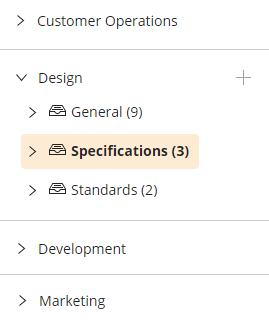
Once the ownership structure is clear, plan the content you want to publish before opening access. Here are some examples of content assets you should build before rollout:
With these resources in place, your intranet will be able to provide immediate answers and show employees how it can save them time and headache.
At this point, you’re ready for launch. But for long-term success, you need to do it the right way. Let’s break this down into two parts:
Launches that focus on hype tend to under-deliver because the content underneath isn't ready yet. The company announces the platform, leaders send out a few launch emails, maybe there’s a kickoff event or training session, and then employees log in to find half-finished pages and barely useful content. That’s a bad first impression.
If an employee logs in on day one looking for something simple, like the PTO policy or the link to submit an IT ticket, and can't find it in a few clicks, there's a good chance they'll go back to asking coworkers in Slack instead. And when employees find the intranet to be unreliable, it’s harder to build adoption momentum.
A quiet, well-prepared launch with seeded content and a clear sequence outperforms a noisy launch with an empty platform every time. Jostle's pre-launch checklist and 14 ways to promote your launch give you a tactical playbook to borrow from.
Before a full rollout, start with a pilot to catch the issues you didn't anticipate. Run a single department or office on the platform for two weeks, gather feedback in a focus group or short survey, and adjust before opening access org-wide.
Our onboarding documentation is direct on this: keep the no-intranet transition short so the disruption window stays manageable. Aim for a pilot of two to three weeks, then a fast cutover, rather than a six-month dual-running period that confuses everyone about which system is canonical.
It’s now time to track whether your rollout plan was successful. But tracking just logins is not the way to do that. Logins tell you whether the platform is in someone's bookmark bar. They don't tell you whether the intranet is doing useful work.
Measure adoption across three buckets.
Start with logins, but split them by location and segment. The Engagement Metrics Snapshot on Jostle tracks 7-day and 28-day unique logins, plus the share of those logins coming from mobile.
Pull the report from Admin Settings > Analytics > View Engagement Metrics, then segment unique logins by location.
Mobile share matters too, especially if you have frontline workers. Mobile logins under 20% in a frontline-heavy organization usually means the platform isn’t as useful outside of the office.
Engagement tells you whether the platform is a destination or a billboard. The engagement metrics that matter most are News Item View Count, comment volume, Sign-off completion rate on critical posts, and total Shout-Outs posted week over week.
News metrics at the item level show which posts actually got read, and the Sign-off Report on a News Item tells you who acknowledged a policy and when. You’ll also want to monitor comment volume, which tells you if the social layer is becoming an everyday resource, or just something employees feel obligated to use every so often.
Adoption only matters if it changes operational outcomes. To understand the impact of adoption on operational outcomes, you need to track business-impact metrics. These metrics are slower to move and harder to attribute, but more meaningful. Here are some examples of business-impact metrics you can track:
In addition to these metrics, you can use feedback loops for additional context. A short pulse survey every quarter ("what did you go to the intranet for last week, and did you find it?") gives the comms team something the analytics can't tell them on its own, which is whether the search and findability work is keeping up with how employees actually search.
Our reports show that publishing 2 to 3 News Items per week increases engagement by 25% compared to organizations publishing fewer than 1 per week.
Month-one adoption is the easy part. Giving them a reason to keep coming back a few months later is much harder.
Re-engagement runs on a content cadence and a pull mechanism that brings inbox-first employees back in consistently. The Weekly Digest is auto-generated per user with content tuned to what they've viewed and where they're located, covering Featured News, trending Activity posts, Library additions, and upcoming events.
The goal of Digests isn't to deliver everything in email. It's to give employees a specific, relevant reason to click through to the platform each week, where the full context, conversation, and resources actually live.
For posts that genuinely can't wait, Notify pushes a non-opt-out alert to email and mobile. Don't overuse it, because employees will learn to ignore it. Reserve Notify for content that actually needs an immediate response, like a safety update or an executive announcement that affects everyone.
For evergreen content like the welcome message or onboarding orientation, the ‘Pin permanently’ option keeps the post in the News banner until everyone in the target audience has read it, then it quietly retires itself.
Long-term engagement also depends heavily on recognition. Company news alone usually isn't enough to keep employees connected to the platform over time. Features like Activity and Shout-Outs give employees and managers a lightweight way to recognize coworkers publicly, especially when recognition is tied back to Org Values or specific contributions.
The Org Values setup at Admin Settings > Views and Functions > Configure Organization Values requires a one-time configuration before they show up in the Shout-Out picker, so build that into the pre-launch governance work.
A lot of the adoption problems covered in this guide aren't caused by one bad rollout decision. They're usually the result of how traditional intranets are structured.
When ownership is unclear, content goes stale. When communication is treated purely as top-down broadcasting, employees disengage. And when a search returns outdated or inaccessible information, people stop relying on the platform altogether. Over time, the intranet turns into a collection of disconnected pages that employees only visit when they absolutely have to.
Jostle makes it easier to improve and sustain adoption over the long term. Here’s how:
If you're still in the planning phase, our broader piece on how to build an intranet covers the foundation. If you've already launched and adoption is sliding, get a Jostle demo. It takes about 30 minutes and gives you a concrete picture of what the platform looks like in your org's context.
The right benchmark depends on your workforce mix, the depth of content seeded at launch, and how visibly leadership is using the platform in the first six weeks. Also, industry benchmarks are scarce and inconsistent, so the more useful answer is to set an internal baseline before launch and measure improvement against it at 30, 60, and 90 days. Look at weekly active users by location and by role rather than a single org-level number, since aggregate adoption can hide a 30-point gap between HQ and the field.
Through adoption, engagement, and business impact. Adoption tells you whether people are showing up, measured through weekly active users by location and mobile login share. Engagement tells you whether they're interacting, which shows up in News Item views, comment volume, Sign-off completion, and Shout-Out frequency. Business impact is the slower-moving set, and includes metrics like search success rate on the top queries, drop in IT tickets for questions the intranet should answer, and how long onboarding takes for new hires. The Engagement Metrics Snapshot in Jostle covers most of these directly at Admin Settings > Analytics > View Engagement Metrics.
A focused rollout can launch in two to four weeks if the governance work is done in parallel and content is pre-seeded. Most stalled rollouts come from organizations that tried to launch in a week without the pre-work, or stretched the project across six months and lost momentum. The faster you can get to a pilot with real users, the faster you'll know whether the rollout plan is working.
Internal comms typically owns day-to-day operations because the platform is primarily a communications and culture tool. HR owns policy content. IT owns SSO, provisioning, integrations, and security. The handoff points need to be explicit, so make sure you’ve decided who approves a new Volume in Library, who escalates a moderation issue, and who owns the Mandatory Moderator role. Without a documented governance model, ownership defaults to whoever spoke last in the meeting, and that’s a problem.
Audit the content, retire what's stale, and reset ownership before you do anything visible or consider a relaunch. Then bring back a content cadence: 2 to 3 News Items per week from leadership, a weekly Digest that actually reaches people, and Shout-Outs that recognize specific contributions. Add a quarterly pulse survey to measure whether the work is changing the experience. A quiet, six-week reset usually outperforms a loud relaunch that adds new features without fixing the underlying governance issues.





Read more by
Gabe Scorgie

Jostle’s employee success platform is where everyone connects, communicates, and celebrates at work. Find out more at jostle.me. © 2009–2026 Jostle Corporation. All rights reserved.



.png)